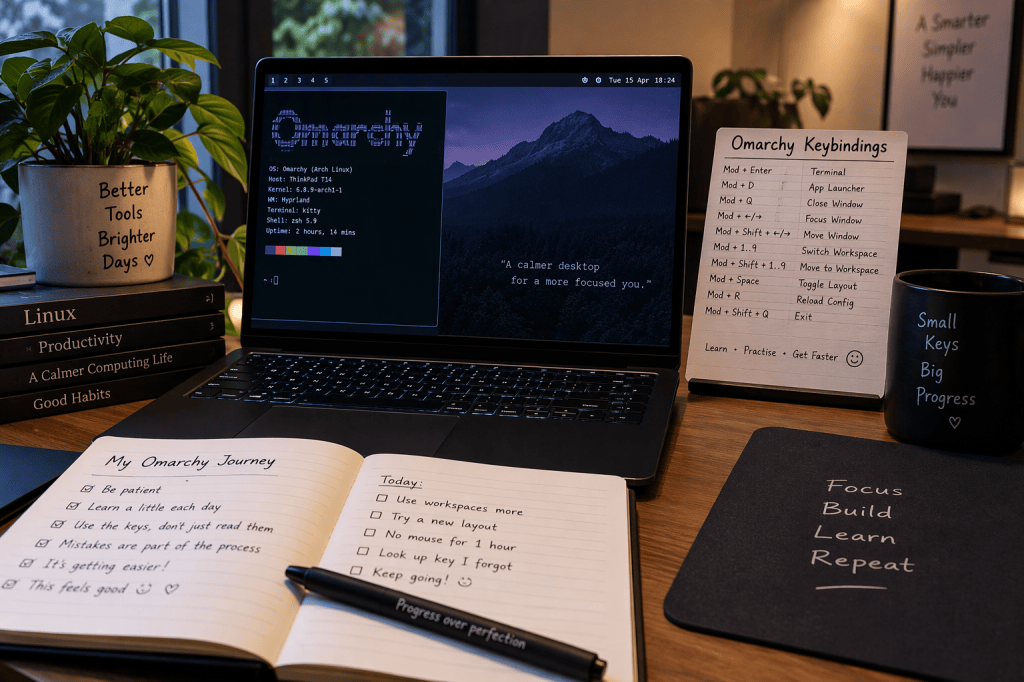
One of the most enjoyable parts of using Omarchy is learning how the keyboard shortcuts work together to create a fast and efficient workflow. At first, it can feel a little overwhelming, especially if you’re coming from a traditional desktop environment where most actions are performed with a mouse. However, with a bit of patience and experimentation, the keybindings quickly become second nature.
Testing different key combinations is one of the best ways to learn. Opening applications, switching between windows, moving workspaces, and adjusting layouts using only the keyboard helps build muscle memory. Each session reveals another shortcut or feature that makes everyday tasks quicker and more intuitive.
The beauty of Omarchy is that it encourages hands-on learning. Rather than memorising a long list of commands all at once, users can gradually discover shortcuts while carrying out real tasks. Before long, actions that once required several clicks can be completed with a simple key combination.
Learning the keys is also a great way to understand how the system is designed. The shortcuts are generally logical and consistent, making it easier to predict new commands as you become more familiar with the environment. This creates a smooth learning experience where confidence grows with every successful action.
For many users, the process of testing and learning the keys becomes part of the fun. Each new shortcut mastered feels like unlocking another level of productivity. Over time, navigation becomes faster, workflows become more streamlined, and the keyboard becomes the primary tool for interacting with the system.
Omarchy rewards curiosity and practice. The more time spent experimenting with the keybindings, the more natural and efficient the experience becomes, turning everyday computing into a faster and more enjoyable process.
Learning Omarchy One Key at a Time
When I first started using Omarchy, I quickly realised that the biggest challenge wasn’t installing it or configuring it. It was learning to trust the keyboard. Coming from a more traditional desktop environment, I was used to reaching for the mouse whenever I wanted to open a program, switch windows, or move between tasks. Omarchy pushed me out of that comfort zone.
At the beginning, I kept a cheat sheet nearby and constantly forgot key combinations. Some days I would remember a shortcut perfectly, only to draw a blank the next morning. Instead of trying to memorise everything at once, I found it much more effective to focus on a handful of keys and use them repeatedly until they became automatic.
One thing I’ve learned is that making mistakes is part of the process. Pressing the wrong combination, opening the wrong application, or accidentally changing a layout helped me understand how the system worked. Every mistake taught me something new. Gradually, the keyboard stopped feeling like a collection of commands and started feeling like a natural extension of the workflow.
My Practical Key-Learning Routine
Rather than trying to learn dozens of shortcuts in a single session, I adopted a simple routine:
Day 1: Window Management
- Learn how to open applications.
- Switch between windows.
- Close windows.
- Move windows around the workspace.
Day 2: Workspaces
- Move between workspaces.
- Send applications to different workspaces.
- Build the habit of organising tasks instead of stacking windows.
Day 3: Layouts
- Experiment with tiling layouts.
- Resize windows using only the keyboard.
- Test different arrangements to find what feels natural.
Day 4: Applications
- Launch your most-used programs entirely with shortcuts.
- Stop using desktop icons and menus whenever possible.
Day 5: Challenge Day
- Spend an hour using Omarchy without touching the mouse.
- Keep a note of the shortcuts you forget.
- Practise only those shortcuts the following day.
The Reward
After a few weeks, something interesting happened. The shortcuts I struggled with became instinctive. Opening terminals, moving between workspaces, and arranging windows happened without conscious thought. Tasks that once took several clicks became a quick sequence of key presses.
That’s what I enjoy most about Omarchy. It isn’t just about learning shortcuts. It’s about developing a smoother, more focused way of working. Every new key combination mastered feels like a small achievement, and over time those small achievements add up to a desktop experience that is faster, cleaner, and surprisingly satisfying to use.
The best advice I can give is simple: don’t try to learn everything at once. Pick a few keys, use them every day, and let repetition do the work. Before long, you’ll find yourself navigating Omarchy without thinking about the keys at all.

